ニキビ治療薬の通販~皮膚科の処方薬を手軽にネットで注文~
市販薬だと治りづらいニキビは皮膚科の処方薬で治す!
鏡に映ったニキビが気になる…成人してからポツポツとあらわれる大人ニキビに悩まされていませんか?
皮膚科で処方されるニキビ治療薬に比べると市販薬の効き目は“かなり”控えめ!
市販されているニキビの薬を試してみたけど、なかなか思うようには治らなかった。こんな経験をされたことはありませんか?薬局やドラッグストアにおいてある市販薬は、病院で処方される医薬品に比べて効き目が控えめで対応する症状も限定的です。
ニキビは、皮膚科や美容クリニックを受診して治療すべき「尋常性ざ瘡(じんじょうせいざそう)」という肌の病気です。皮膚科や美容クリニックで行われる一般的なニキビ治療では、肌の状態に応じて適したニキビ治療薬が処方されます。
皮膚科で処方されるニキビ治療薬はインターネットで注文できます。
仕事やプライベートで忙しく、皮膚科に通うスケジュールが確保できない方は少なくありません。そんなときに活用したいのが、皮膚科や美容クリニックで処方される医薬品の個人輸入を代行する「医薬品アットデパート(旧:@通販)」です。
利用方法は一般的な通販サイトと同じで、通勤途中・ランチタイム・就寝前など24時間いつでも利用できます。海外の販売店から直接発送されるため、商品の配送には注文した日から数えて最短でも7日程度かかります。
ニキビ治療の世界標準となっているスタンダードな塗り薬
大人ニキビの治療には、毛穴の角質を取り除く薬や炎症を抑える薬が効果的です。
国内外の標準的なニキビ治療に使用されている治療薬は次のとおりです。どちらの薬も、炎症をおこす前のニキビと炎症をおこした後のニキビの両方に有効です。
-
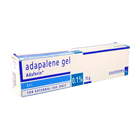
ディフェリンゲル(アダフェリン)0.1%は、ニキビの原因となる毛穴の角質を取り除く塗り薬です。炎症をおこす前の初期ニキビであれば、ディフェリンゲル(アダフェリン)0.1%だけで治療することができます。炎症をおこした後のニキビに対しては、外用または内服の抗生物質との併用が効果的です。
-
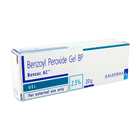
ベピオゲル(ベンザックACジェル)2.5%は、炎症をおこす前の白ニキビと炎症をおこした後の赤ニキビの両方に有効な塗り薬です。有効成分である「過酸化ベンゾイル」には、顔のニキビを引きおこす毛穴の角質を除去する作用と、アクネ菌の増殖を抑える抗菌作用を併せもっています。
ニキビの進行レベルは全部で5段階!
顔にできるニキビは全部で5つの段階を経て進行します。ニキビ肌の発生・悪化を防ぐためにも、まずは症状ごとの特徴をしっかりと把握しておきましょう。
第1段階:白ニキビ
白ニキビとは、毛穴が角栓でフタをされ中に皮脂が溜まっている状態です。毛穴の周辺が炎症をもおこしておらずニキビの初症状であるため、正しい方法でケアすれば痕を残さずキレイに治せます。
第2段階:黒ニキビ
黒ニキビとは、毛穴の出口に顔を出した皮脂が空気に触れ表面が黒く酸化した状態です。毛穴に皮脂が溜まってから、ある程度の時間が経過している証拠であり、炎症をおこすかどうかの境目でもあります。
第3段階:赤ニキビ
赤ニキビとは、毛穴の中で原因菌が増殖し炎症をおこしている状態です。炎症によって毛穴周辺の組織がダメージを受けると、赤いシミや色素沈着をおこしやすくなります。
第4段階:黄ニキビ
黄色ニキビとは、毛穴周辺の炎症が進み、化膿してしまった状態です。ニキビの原因菌が増殖することで膿が溜まり、ニキビの見た目が白から黄色っぽく変化します。高い確率でシミやクレーターといったニキビ痕が残ります。
第5段階:紫ニキビ
紫ニキビとは、炎症と化膿を何度も繰り返し、毛穴の内部に血と膿が混ざって溜まっている状態です。紫ニキビのような極めて重症な症例は、時間をかけなければ治せません。適切な対処法を把握して、少しでも治療期間を短縮しましょう。
ニキビは何故できる?しっかり原因を把握して正しく対策
ニキビは毛穴の詰まりや皮脂が過剰に分泌されることによっておこります。では、それらがおこる理由は何なのか?ニキビ肌を根本から改善するには、原因を正しく把握することが大切です。
心や身体に多くのストレスがかかると毛穴の詰まりや皮脂の過剰分泌がおこります。
ストレスは美容の敵であることは誰もが認めるところであり、医学的にもニキビとの関連性は明らかにされています。しかし、具体的な理由まで正しく理解されている方は多くありません。ストレスによりニキビができるメカニズムを理解して、効率よく症状を改善させる糸口を掴みましょう。
ニキビはビタミンの摂取量と消費量のバランスが崩れるとできやすくなります。
ニキビを改善するために欠かせない、ビタミン補給についての基礎知識を紹介しています。ニキビの改善に有効とされるビタミンも、補給の仕方を間違えると逆効果になる場合があります。1日も早く美肌を取り戻すためにも、ニキビとビタミンの関係性をしっかりと把握しておきましょう。
ホルモンバランスが乱れることでニキビの発生率は高まります。
人間の肌が正常に保たれているのは、男性ホルモン・女性ホルモンという大きく分けて2種類のホルモンがバランスよく分泌されているからです。このホルモンのバランスが乱れると、肌の新陳代謝や皮脂の分泌に悪影響を及ぼします。ニキビの根本原因となるホルモンバランスの乱れを整える方法について解説します。
肌の乾燥はニキビ発生のキッカケとなる毛穴の詰まりを誘発します。
肌の水分が不足し乾燥するとニキビを引きおこす毛穴の詰まりを誘発するため、肌を保湿することが重要なのです。保湿の方法を間違うと、肌の潤いを奪いニキビを悪化させたりシミをつくる原因になります。正しい保湿の仕方を今一度チェックしておきましょう。
炎症をおこしたニキビは毛穴の中で原因菌が繁殖することで発生します。
炎症性のニキビは、毛穴の中で原因菌が増殖することで発生します。顔と身体で主な炎症をおこす場所によって菌の種類が違います。ニキビ肌をキレイに治すには、炎症をおこしたニキビの発生や悪化を正しく防げるかどうかがカギとなります。そのためにも、ニキビを悪化させる原因菌の種類や特徴を事前に把握しておきましょう。